Arcynal
For painters, handymen, remodelers, sign shops and small crews

Stop finding out a job lost money after it is done.

Profit Before You Quote is an Excel workbook that shows your true cost, margin and profit on every job before the quote goes out. Use it on your next estimate. If it does not change a number in a quote you send, you get your $97 back.

30-day refund. First 10 buyers get a 15-minute setup call with us.

Job profit preview
Repaint, 2 bedrooms
Job profit
$453
Price $2,400
True cost $1,947
Margin 18.9%
Labor, 38 hrs
$1,254
Materials
$462
Subs, haul-off
$66
Unbilled extras
$165

You did the job right. The job still lost money.

Not because you cannot do math. Because the number you quoted was never the number the job cost.

01

The hours nobody counted

Prep, supply runs, cleanup, call-backs. You bill the 38 hours on the ladder and eat the 9 around it.

02

The second trip

Materials, rentals and haul-off that landed after the price was set. Small each time. Not small by December.

03

The yes you never wrote down

The add-on you agreed to on the spot. It was never in the quote, so it was never in the invoice.

Then there is markup. A 25% markup feels like 25% profit. It is a 20% margin. Add 20% and you keep 16.7%. The gap never shows up on one line. It shows up when the year is over and the bank balance does not match the work.

This is not a pricing problem. It is a visibility problem.

You cannot fix a number you never saw. Most owners see the margin on a job once it is paid, when it is too late to do anything but remember it. This workbook moves that moment to before you send the price.

  1. Enter the job. Labor hours, materials, subs, equipment, overhead. Ten minutes.
  2. Set the margin you want. It calculates the price from your margin, not from a markup guess. It warns you if the job falls below your floor.
  3. Send the quote. Customer-ready, with the profit already checked. After the job, enter actuals and see where the estimate was off.

Everything you need to quote with the profit in view.

One download. Opens in Excel on your computer. Nothing to install, no login, no subscription.

01

The job-profit workbook

Estimate, profit preview, price scenarios, change orders, actual vs estimate and a customer-ready quote, in one file.

02

A filled-in sample job

See it work in two minutes before you enter a single real number.

03

Change-order tracker

Write the extras down when you say yes, so they reach the invoice.

04

Margin vs markup card

One page that shows why markup leaves money behind and what to add instead.

05

5-line quote script

A short way to present the price and handle the change request without flinching.

06

15-minute setup call (first 10 buyers)

We put your real numbers in together. It stops at 10 because it is our own time.

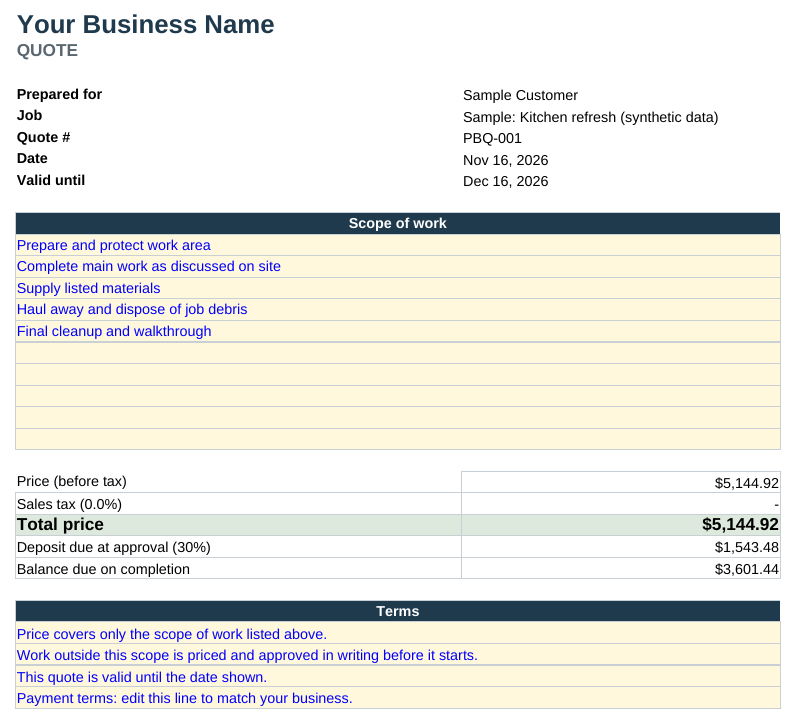
This is what you see before you send the price.

Real screens from the sample job (synthetic data). Left: where the price goes and what is left as profit. Right: the customer-ready quote it produces.
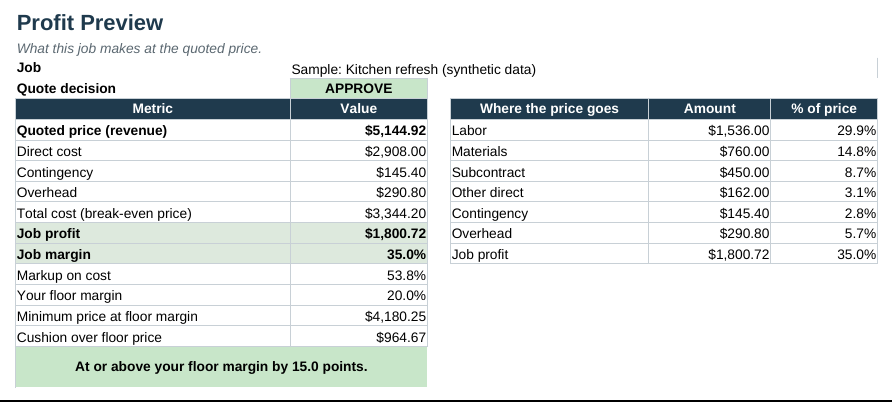
Profit Preview sheet: quoted price, costs, job profit and margin, with a floor-margin check
Profit Preview: price, cost, profit, margin vs your floor
Customer quote sheet with scope of work, price, deposit and terms
Customer Quote: scope, price, deposit, terms

One missed extra can cost more than the kit.

Look at the example above. A $2,400 repaint with $453 of profit. One $165 extra that never made it onto the quote is more than a third of that profit. This is an example, not a promise. Your jobs and your prices decide your numbers.

Markup you addMargin you actually get
20%16.7%
25%20.0%
30%23.1%
50%33.3%

Use it on one real estimate. If it changes nothing, you get your money back.

If the workbook does not change at least one number in a quote you send, email us within 30 days and we refund you in full. No hoops. No other promise is made. We cannot promise you a result, because your results depend on your jobs and your prices. We can promise you will see the real margin before you send the price.

This is for you if

  • You run jobs in painting, handyman and repair, remodeling, landscaping, sign and print, or similar trades
  • You quote by the job and suspect some of them paid less than they should
  • You work from a laptop or desktop and are comfortable in Excel

This is not for you if

  • You already run every quote through an app and like what it shows you
  • You only work from your phone. It is built for Excel on a computer. Google Sheets and Excel mobile are not fully tested
  • You need invoicing, scheduling or payments. It does none of those

Straight answers.

Why a workbook and not an app?
Your numbers stay in a file on your computer. No login, no monthly fee, nothing to cancel. You can change any formula.
Will it fit my trade?
It is trade-neutral: labor, materials, subs, equipment, overhead. If something is missing for your work, tell us and we will say so honestly.
What if I do not use Excel much?
Open the sample job first. Then use the setup call if you are one of the first 10 buyers.
Is this tax or legal advice?
No. It is a pricing and estimating tool.
Where do my numbers go?
Nowhere. It is a file on your computer.

30-day refund if it does not change a number in a quote you send.

Get the kit: $97